Blender 5.0 has been released with big feature changes in color management and the native support of some of the most used external OCIO configs. Please read the blog post Big Blender 5.0 color management changes.
Blender 4.0.x is shipping with a new OCIO v2 config that replaces Blender FILMIC (OCIO v1) with AgX.
Here is a post on “Xitter” about the topic from Andrew Price.
I also received an Email with a question how to set the “Color Management” settings for AgX in the new release.
So I decided to put this little guide here on my blog.
General settings
The working colourspace in Blender works best in linear-Rec.709/sRGB. This should be the recommended setting for the Sequencer.
I do a lot of tests in ACEScg with different OCIO configs, but be aware of a lot of short comings when using these big gamuts. Some of the general issues I noted down here (the page needs an update urgently).
For MacOS there seems to be now some kind of EDR support. The option is greyed out on my iMac, but I can still enable it, but I haven’t played with it yet. There seem to be some problems with the implementation at the moment. Another thread can be found here.
Working on MacOS with a Display P3 screen
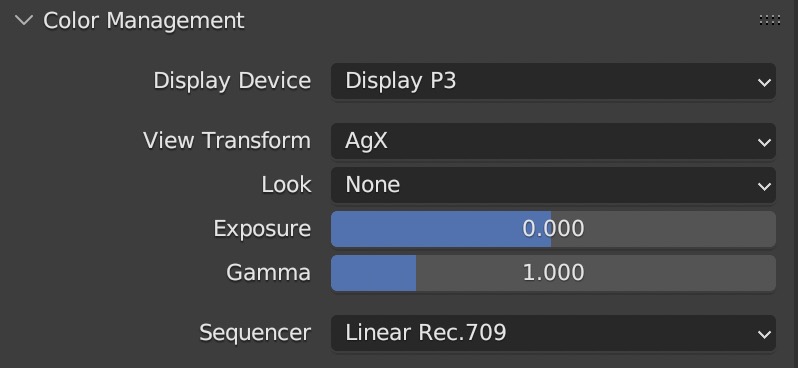
I am working on MacOS on a Display P3 capable screen, so my “Color Management” settings should be the following:
- Display Device – Display P3
- View Transform – Standard or AgX
- Look – choose a desired look “None”, “Greyscale” or “Punchy” for AgX
- The looks – very low contrast to very high contrast are meant to be used with the older FILMIC view transform.
- Sequencer – Linear Rec.709 (the working colour space)
Make sure that the “Color Management” settings are set to the values that make sense for your workflow.
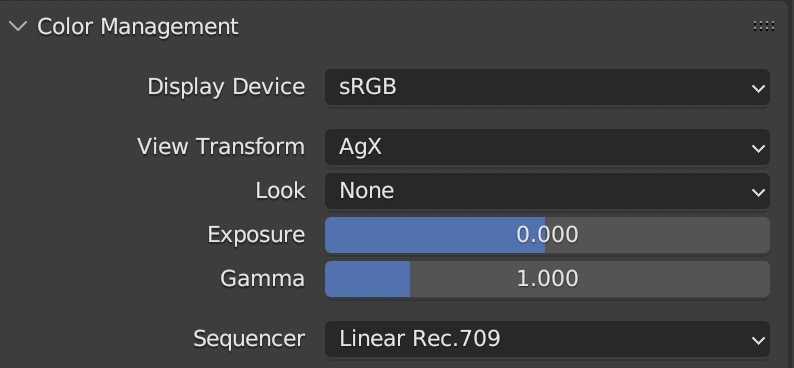
Working on Windows with a sRGB display
That should be it…happy blending…